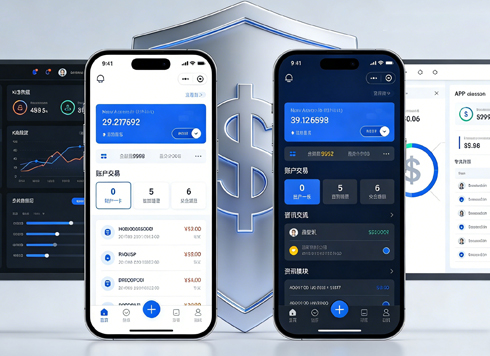




From Prototype to Design Draft: A Guide to the Precise Evolution and Implementation of Product Design
In the full lifecycle of product design, prototypes and design drafts are the core link connecting the preceding and the following. They are not a simple "beautification upgrade", but a systematic evolution from logic verification to visual implementation, and from functional framework to experience closure. Many designers tend to fall into two misunderstandings: either making prototypes into semi-finished design drafts, over-focusing on visuals and leading to logical omissions; or decoupling design drafts from prototype logic, blindly pursuing aesthetics and damaging product usability. To achieve efficient and accurate evolution, it is essential to clarify the positioning of both, follow transformation rules, control key nodes, and ensure every step of evolution serves the final user experience and commercial value of the product.
I. First Clarify the Essence: Core Differences Between Prototypes and Design Drafts
The prerequisite for evolution is to identify the positioning accurately. Only by clarifying the core responsibilities of both can we avoid deviating from the direction. A prototype is the "skeleton" of a product, while a design draft is its "flesh and blood"—the two have clear division of labor and support each other.
1. Prototype: Focus on Logic, Solve "Usability"
The core value of a prototype is to verify functional processes, sort out information architecture, and clarify interaction logic, without pursuing visual aesthetics—even ignoring colors, fonts, and detailed styles. Low-fidelity (Lo-fi) prototypes are mostly presented with wireframes, black/white/gray colors, and placeholders, focusing on marking button positions, page jumps, module hierarchies, and operation feedback; high-fidelity (Hi-fi) prototypes simplify visuals but retain core interactions, used for more detailed process testing.
Core goal of prototypes: Enable the product team, developers, and stakeholders to quickly understand "what functions the product has, how users operate it, and whether the process is smooth", avoid logical loopholes in advance, and reduce rework in later stages.
2. Design Draft: Focus on Experience, Solve "Ease of Use and Aesthetics"
A design draft is the final visual output that integrates visual specifications, brand tonality, and user experience details based on prototype logic, serving as the direct basis for development and implementation. Design drafts need to balance aesthetics and practicality, unify colors, fonts, spacing, icons, and component styles, refine interaction animations, state feedback, and adaptation rules, making the product both recognizable and in line with user operating habits.
Core goal of design drafts: Restore the visual texture of the product, reduce user learning costs, ensure accurate development implementation, and achieve unification of brand and experience.
Core Summary: Prototypes define "logic", design drafts define "presentation"; prototypes do "subtraction", design drafts do "addition"; prototypes verify "feasibility", design drafts implement "experience".
II. Step-by-Step Disassembly: Standard Evolution Process from Prototype to Design Draft
Efficient evolution does not happen overnight, but follows a five-step process: "Review Prototype → Unify Specifications → Visual Filling → Detail Optimization → Delivery Verification". Each step closely adheres to prototype logic and prevents visuals from being decoupled from functions.
Step 1: Prototype Review and Lock-in, Lay a Solid Foundation for Evolution
This is a prerequisite link for evolution and also a key step that is most easily overlooked. Skipping prototype review directly to design will most likely lead to later logical overturns and full revision of designs.
- Confirm prototype finalization: Hold a review meeting with the product team, developers, and stakeholders to confirm no objections to functional processes, page hierarchies, and interaction jumps; freeze the prototype version to avoid design waste caused by mid-term logic changes.
- Sort out core information: Extract key modules, core buttons, required fields, exception states (loading, failure, empty state), and jump rules from the prototype, and organize them into a design checklist to ensure no functional omissions.
- Mark priorities: Distinguish core pages (homepage, detail page, payment page) from secondary pages (settings page, help page), prioritize visual design for high-priority pages to ensure core experience.
Step 2: Build Design Specifications, Unify Visual Language
Design specifications are the "bridge" connecting prototypes and design drafts, ensuring the unity and reusability of design drafts and avoiding visual clutter. Based on product brand tonality and target user groups, build a basic design system:
- Color specifications: Determine primary colors, secondary colors, neutral colors, and functional colors (success, failure, warning, prompt), follow WCAG contrast standards to ensure visual accessibility.
- Font specifications: Select fonts, font sizes, font weights, and line heights for headings, body text, and auxiliary text to adapt to reading experiences on different devices.
- Component specifications: Extract general components such as buttons, input boxes, cards, tags, and pop-ups, and define styles for different states (default, hover, click, disabled).
- Layout specifications: Determine grid systems, spacing, margins, and rounded corners, align with the module layout of the prototype, and do not arbitrarily modify the information hierarchy of the prototype.
Step 3: Visual Filling and Hierarchy Optimization, Align with Prototype Framework
This step is the core of evolution, with the fundamental principle of "not changing prototype logic, only optimizing visual presentation"—transforming black-and-white wireframe prototypes into textured visual designs.
- Retain layout structure: Strictly follow the page layout, module positions, and button sizes of the prototype; do not arbitrarily adjust the positions and proportions of core elements to avoid damaging user operation logic.
- Replace visual elements: Replace prototype placeholders with brand icons, distinguish module hierarchies with colors, add texture with shadows and gradients, and fill content areas with images and illustrations (prioritize placeholders to avoid troubles in later content replacement).
- Strengthen information hierarchy: Highlight core information (e.g., headings, prices, operation buttons) and weaken secondary information (e.g., auxiliary explanations, notes) through font size, font weight, color, and spacing, allowing users to capture key points at a glance.
- Synchronize interaction states: Design corresponding visual feedback for interaction actions marked in the prototype (e.g., button color change on click, pop-up animation, loading animation) to make interactions more intuitive.
Step 4: Detail Polishing and Experience Optimization, Make Up for Prototype Shortcomings
Prototypes only focus on macro logic, while design drafts need to fill in detailed experience to make the product more user-friendly. This step is key to improving the texture of design drafts:
- Improve exception pages: Supplement empty states, 404 pages, loading failure pages, and no-network pages not detailed in the prototype, with warm prompts and guided operations to reduce user anxiety.
- Optimize adaptation rules: Conduct responsive design for different devices (mobile, PC, tablet) and screen sizes to ensure reasonable adaptation of element layout and font size.
- Control visual consistency: Check the unity of colors, fonts, components, and spacing across all pages to avoid multiple styles for the same component.
- User experience testing: Operate the design draft from the user's perspective, check if it conforms to the prototype process, if operations are smooth, and if visuals are comfortable, and adjust unreasonable details in a timely manner.
Step 5: Delivery Verification and Annotation, Connect with Development Implementation
The ultimate value of design drafts is implementation, so verification and annotation must be completed before delivery to enable developers to accurately restore the design.
- Recheck against prototype: Compare design drafts with prototypes page by page to confirm no omissions or changes in functions, processes, and jumps, ensuring designs do not deviate from requirements.
- Improve design annotations: Annotate dimensions, spacing, fonts, colors, rounded corners, transparency, and animation parameters to clearly convey design details.
- Organize delivery package: Export cutouts, component libraries, and design specification documents, synchronize with the development team, and provide timely Q&A support.
III. Avoid Pitfalls in Evolution: These Misunderstandings Must Be Steered Clear Of
1. Pitfall 1: Over-Designing Prototypes, Ignoring Logic Verification
Many novice designers add colors, images, and elaborate icons when creating prototypes, leading the team to focus on visuals and ignore loopholes in functional processes. Remember: The simpler the prototype, the clearer the logic, and the higher the review efficiency.
2. Pitfall 2: Decoupling Design Drafts from Prototypes, Arbitrarily Changing Logic
Randomly moving button positions, deleting modules, or altering jump processes for visual aesthetics will lead to product function disorders and make development impossible to implement. Visuals serve functions, not the other way around.
3. Pitfall 3: Ignoring Design Specifications, Resulting in Chaotic Page Styles
Starting design without unified specifications leads to inconsistent colors, components, and fonts across different pages, making the product unprofessional and increasing the reuse cost for development.
4. Pitfall 4: Neglecting Exception States, Resulting in Incomplete Design
Only designing normally displayed pages and omitting exception pages such as loading, empty state, and error will lead to fragmented product experience, leaving users helpless when encountering problems.
IV. Summary: Good Evolution is a Two-Way Effort of Logic and Vision
From prototype to design draft is not a simple "upgrade of appearance", but a transformation of product design from abstract framework to concrete implementation. Prototypes define boundaries and clarify directions for design drafts, while design drafts endow prototypes with warmth and enhance experience—both are complementary and indispensable.
Excellent designers can not only clarify logic with prototypes but also refine experience with design drafts. On the basis of adhering to product logic, they use visual language to convey brand value, ultimately creating high-quality products that are easy to use, aesthetically pleasing, and easy to implement. Mastering this evolution process can not only improve design efficiency but also reduce team communication costs, making every design draft a solid foundation for product implementation.
-
 UI Design & Prototype for Sunwayland's ThingNet IIoT Platform
UI design and prototyping for ThingNet IIoT ...
-
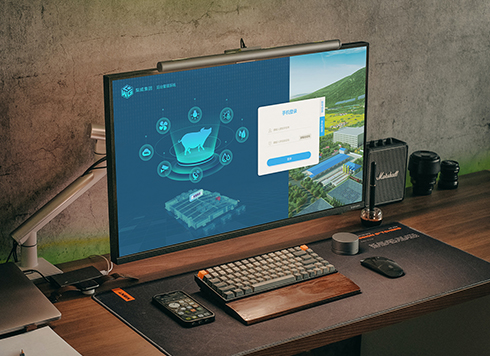 Livy Pig Farming IoT Platform UI Design
This IoT system uses sensors to monitor hog ...
-
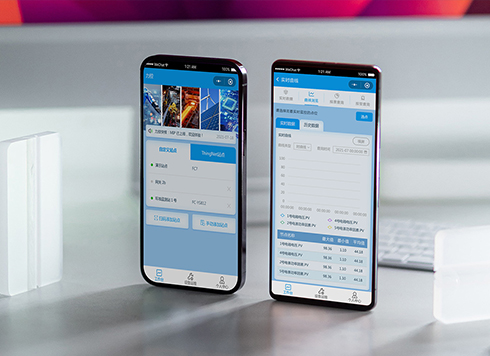 Likong Industrial IoT Tech Co., Ltd. Mini-program UI/UX Design
IIoT firms: mobile mini-program + platform. ...
-
 UI Design of the Internet Advertising Platform (a Sci-tech Sense Official Website)
The corporate website UI features a futuris ...
-
How Much of Your Artistic Foundation Do You Really Use in UI Design Projects?
Date: Sep 8, 2026 Read: 37
-
Dark Mode UI Design Never Looks Right: Which Comes First, Background or Text?
Date: Aug 23, 2026 Read: 48
-
Do UI Designers Need to Know Code? Where Do You Get Stuck Without It?
Date: Aug 20, 2026 Read: 58
-
Why Is the UI Still Inconsistent Even with Design Specs?
Date: Aug 17, 2026 Read: 59
-
UI Design: Why Does It Still Look Amateur When Following Basic Standards?
Date: Aug 16, 2026 Read: 53