



In the admin, I filter by status, open a ticket, then go back and the list resets to all—did the browser forget, or were the filters never saved?
Bottom line first: When filters set in an admin list reset to all items after opening a record and going back, it is usually not because list refresh or the pagination component is broken, but because the filter state exists only in page memory from start to finish. In 2026, a more common delivery approach is to split filters by lifecycle into three types: the query view that must still be restored after refresh, bookmarking, or forwarding, written into URL query parameters; preferences that are valid only within the current session, placed in session storage; and transient state such as checkboxes and expanded rows, simply not stored. If these three types are not separated first, the result is often back-and-forth blame: users say the system has a bad memory, while developers say users did not look carefully.
What is really lost when filter conditions disappear
Filter conditions on a list page are, in essence, the user's current 'query view'—which time range, which status, and which owner's records they are looking at. If this view is not placed in the URL, it belongs only to the current page instance: it disappears after one refresh, disappears after one back action, and when the link is sent to a colleague, the colleague still opens and sees all data.
What it affects is not whether the UI looks good, but the cost of checking and reproducing. Operations reconciliation needs to filter again by the same criteria, customer service needs to reproduce a screen of records based on what the user described, and shift handover needs to tell the next person which conditions were filtered. If conditions are not remembered, these actions must be repeated every time; the extra time per round is usually in the range of a few minutes, and if repeated more than ten times a day, it is no longer a small number.
- Lost on back: Returning from the detail page, the browser requests the default list URL again, and the conditions are reset to zero.
- Lost on refresh: The user presses refresh, or the page reloads after network jitter, and the filtered conditions vanish.
- Forwarding fails: Sending the current link to a colleague, the colleague opens it and sees all data.
- Bookmarking fails: Saving a frequently used filter as a bookmark, the next time it is opened it is still the original list.
Separate the three types of state first, then decide where to store them
Treating 'filter conditions' as one whole and storing it directly is a common starting point for rework. According to enterprise project delivery practice, a more reliable sequence is to first split state by lifecycle into three types, then assign a storage method to each—the three types differ completely in shareability, validity period, and cost of error; storing them together easily carries along things that should not travel with the link.
- Query view (shareable, must be restored): Conditions that make up 'what data I am looking at', such as time range, status, owner, and keywords, must survive refresh, back, and forwarding, and are generally written into URL query parameters. The experience range for condition items is 3 to 8 short parameters; with more, the link becomes long and hard to read.
- Session state (valid within the current login): Preferences such as rows per page, column visibility, and table density do not affect which data is seen, only how it is arranged; placing them in session storage is enough, and there is no need to pollute the URL.
- Transient state (invalid upon leaving): Which rows are checked, which row is expanded, and which cell the mouse is over. Writing this type of state into the URL is actually risky; forwarding it would carry the selections of others as well, so it is usually not stored or kept only in memory.
After the split, the solution comparison becomes clear. Looking at four dimensions—whether refresh can restore, whether it can be shared, implementation cost, and main risk—the three common approaches each have clear boundaries. Implementation cost is estimated for the mid-and-back-office scale commonly delivered in 2026:
- URL query parameters: Refresh, back, bookmarking, and forwarding can all restore; implementation cost is medium, with parameter parsing plus control repopulation usually ranging from half a day to two days; the risk is too many parameters, or sensitive values such as mobile numbers and ID numbers, which should not be put into the link in plain text.
- Session storage: Refresh can restore, and back usually can too; switching tabs or logging in as another person may cause cross-contamination or loss; implementation cost is relatively low, usually deliverable within half a day, and it is suitable for preference-type state.
- No storage: Cost is close to zero, suitable for one-off queries or cases where the conditions themselves have no reuse value.
According to 2026 delivery habits, most admin lists land on a combination of the first and second: query view in the URL, preferences in the session, and checkbox-type state in no persistent location.
Delivery reality: when phase one only gets two or three days, which items should be protected first
Tight schedules are the norm. In the experience range, when an admin phase one is given two or three days, teams often take the easy route and stuff the entire screen's filter state into browser local storage, on the grounds that it looks like the smallest change.
After launch, problems mostly appear in two places: opening two tabs on the same computer to query different conditions causes them to overwrite each other, and users think the data is corrupted; after switching accounts, old conditions are still attached, and the view seen is from the previous account. These two types are not easy to reproduce during self-testing and are often pointed out by the client during acceptance or trial operation, at the cost of a small rework plus a round of explanation.
A less troublesome approach is to protect only three things in phase one: time range, status, and keywords. These three cover most checking scenarios; in implementation, write them directly into the URL and do not protect the rest for now. In exchange, links can be shared and back can restore; the cost is that the first screen needs one more round of parameter parsing and fallback for invalid values—for example, if a parameter is manually changed to a non-existent status value, it should fall back to the default rather than an error page. This kind of fallback usually accounts for only about half a day of work in the experience range, but if missed, it will be filed back as a defect. When Xiyue Company delivers admin systems, it puts this step into the acceptance checklist rather than leaving it for phase two.
What counts as acceptable: several acceptance criteria you can check against
Whether filter state is handled well is not judged by how clever the code is, but by whether a few specific actions pass. The following items can be used directly for testing; if any one fails, users will get stuck in some real workflow.
- Back can restore: After setting filters, opening the detail page, and using browser back, both the conditions and the pagination position are still there, and no extra duplicate requests are triggered.
- Refresh can restore: After reloading the page, the conditions are still there, and what is shown on the controls matches what is in the URL.
- Link can be shared: Send it to a colleague with the same permissions, and the colleague sees the same set of data; conditions without permission should be ignored rather than causing a direct error.
- Reset must clear together: After clicking 'Reset', the URL parameters are cleared at the same time; otherwise users think it has been reset, but it comes back after a refresh.
- Invalid parameters have fallback: Manually corrupted parameters, such as a non-existent status value or an invalid date, should fall back to the default and not produce a blank page.
- Sensitive fields do not enter the link: Mobile numbers and ID numbers should not appear in the URL in plain text; use record IDs instead, or simply do not preserve them.
Counterexamples are also typical: the conditions are indeed repopulated, but they are shown only on the controls and not synchronized to the URL, so they disappear as soon as the user refreshes; or the URL is synchronized, but the page number is not repopulated, so after coming back the user stays on page 1 and mistakenly thinks there is less data. Both look done but are actually only half done.
Applicable scenarios and boundaries
This approach suits admin systems with a clear checking chain: scenarios such as orders, tickets, financial transactions, and customer service records that need to be queried repeatedly by the same criteria and passed between people. When there are fewer than a dozen condition items and they can be compressed into a few short parameters, the experience benefit is relatively obvious.
- Suitable for: Lists that are repeatedly filtered by the same set of conditions; the same view needs to be forwarded between colleagues; users need to return from the detail page repeatedly to continue processing.
- Not necessary: One-off queries or temporary spot checks on a single order number; conditions necessarily contain sensitive information; the page itself is a dashboard-style overview with no path of filtering and then entering details.
- Use with caution: When parallel comparison across multiple tabs is the main usage, session storage will overwrite each other; in this case, prefer the URL over local storage.
The boundary can be remembered in one sentence: Only a query view that can be shared with others is worth putting into the URL; personal preferences and checkboxes should not travel with the link. If it is unclear which type a state belongs to, handle it as not stored first—this is safer than storing it in the wrong place.
FAQ
Which is less troublesome: storing filter conditions locally or writing them into the URL?
Local storage is quick to implement, but the problem is that switching tabs or accounts easily causes interference; writing into the URL adds a parsing step, but in exchange refresh, back, and forwarding can all restore. For checking-oriented admin lists, prefer the URL.
When there are many conditions, the URL becomes too long to read; how should it be trimmed?
Move preferences that do not participate in the query, such as rows per page and column visibility, to session storage, and let only time, status, and keywords enter the link. It is commonly kept to 3 to 8 short parameters, with the rest filled in by defaults.
If the user clicks reset, should the URL be cleared as well?
Yes. Reset is an explicit user instruction; if only the controls are cleared but the URL is not, the conditions come back after refresh, and users will conclude that reset did not work. This kind of misjudgment is very common in admin systems.
When entering details from a message notification and then going back, why does it still return to all items?
Message entry points generally carry only the detail URL and no parameter context for the list. A common approach is to remember the source link on the detail page and restore according to the source when going back, rather than relying only on browser back.
If the conditions include mobile numbers or ID numbers, can they still be written into the URL?
It is not recommended to write them into the link in plain text. A common approach is to replace them with record IDs or use a masked mapping; if they really must be preserved, first preserve only fields that do not contain personal information, such as status and time range.
If your admin system is stuck at the point where 'users keep saying the filters are gone', it is advisable to first walk through one real checking chain: filter conditions, enter details, go back, refresh, and forward, and see which step breaks. Once it breaks, decide whether to add URL parameters or only add back restoration; there is no need to do everything at once. When condition items exceed a dozen, or necessarily contain sensitive fields, define the query criteria first, then discuss state preservation.
-
 UI Design & Prototype for Sunwayland's ThingNet IIoT Platform
UI design and prototyping for ThingNet IIoT ...
-
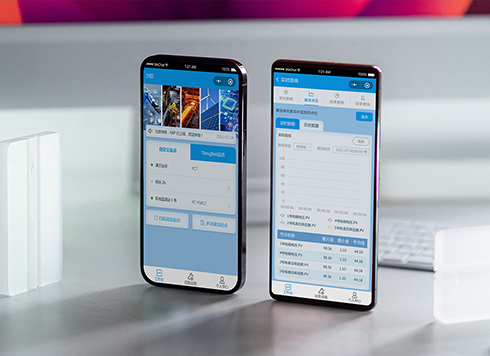 Likong Industrial IoT Tech Co., Ltd. Mini-program UI/UX Design
IIoT firms: mobile mini-program + platform. ...
-
 Livy Pig Farming IoT Platform UI Design
This IoT system uses sensors to monitor hog ...
-
 UI Design of the Internet Advertising Platform (a Sci-tech Sense Official Website)
The corporate website UI features a futuris ...
-
Is grey placeholder text mistaken for filled input because the hint looks too much like content, or because the field label has nowhere to sit?
Date: Nov 4, 2026 Read: 5
-
When users reach the third screen of a form and realize Save is still at the bottom, forcing them to scroll back and forth — should that button stay pinned to the screen?
Date: Nov 3, 2026 Read: 11
-
When support handles dozens of tickets a day, should the two or three most-used row actions move outside the “More” menu?
Date: Nov 2, 2026 Read: 18
-
Bottom-of-page dropdown options show only partially when opened: is the popover not flipping up, or is it clipped by an outer container?
Date: Oct 31, 2026 Read: 30
-
The form is complete but the submit button is still gray and users keep clicking because they think it didn't save—are the disabled conditions unclear or is validation feedback lagging?
Date: Oct 30, 2026 Read: 43