



Will Using Microsoft YaHei or Source Han Sans in Commercial UI Design Cause Licensing Issues?
In commercial UI projects, using Microsoft YaHei directly for interface text, strictly speaking, carries a licensing risk; switching to open-source fonts such as Source Han Sans is reliable in most cases. For enterprise project deliveries in 2026, we review the font license on the first working day before finalizing which font family to use. If you are not sure whether a font can be used commercially, running through four steps—license scope, weight coverage, screen rendering, and development embedding—will help you avoid most preventable font issues.
Why Are Interface Fonts More Likely Than Images to Be Overlooked in Copyright Checks?
Font licensing is less intuitive than image licensing: a font that is free to display on your computer is not necessarily free when you put it into a commercial product. Chinese fonts such as Microsoft YaHei and PingFang SC are usually owned by the foundry or the OS vendor. Being able to use them in the system does not mean you may package them into your own app or web server. From the project reviews we have worked on, the three most error-prone scenarios are:
- A font you can select in a design tool is not automatically legal for a commercial launch. This is especially true when the client gives you old design files; confirm whether the font was formally licensed for the intended use.
- Fonts labelled 'free download' or 'personal edition' in design software may later require a retroactive license when they are used in enterprise products.
- Exporting images and embedding fonts on the web are different use cases. The former depends on image-use rights, while the latter requires a server-side or in-app embedding license.
Free, Open-Source, and Commercial Font Licenses: The Difference Is Not Just Price
When choosing fonts for UI design, examine the license type first, then aesthetics. Chinese fonts on the market broadly fall into three groups: free-for-commercial-use fonts, open-source licensed fonts, and commercially licensed fonts. They differ not only in price; their weight coverage, screen rendering, and modifiability also have a direct impact on delivery rhythm.
- Free-for-commercial-use fonts: Common options are Source Han Sans, Alibaba PuHuiTi, OPPO Sans, and MiSans. Their license descriptions are relatively clear, and no fee is charged for normal UI usage. Some, however, require developer registration, and a few restrict certain industries. They have the highest actual adoption rate and suit corporate websites, admin backends, and mini programs.
- Open-source licensed fonts: The typical example is Source Han Sans, which is released under the SIL OFL. The license allows commercial use and modification; if you publish a modified font publicly, you must share it under the same license. This choice is suitable for small and medium teams that want to avoid a separate approval procedure.
- Commercially licensed fonts: Enterprise-grade fonts such as FounderType and HanYi are bought per project or per year. Experience range: a single license covering desktop, app, and web usually costs from roughly RMB 1,000–2,000 to RMB 4,000–5,000. Dedicated foundry fonts may cost more, but this is still cheaper than facing liability after launch and replacing the font. Please refer to the foundry's official website for current pricing.
From this, we can conclude: checking the licensing boundary before selecting a typeface makes costs easier to control than changing fonts at the last minute. For ordinary UI projects where the only goal is to keep text organized and legible, free-for-commercial-use fonts are sufficient.
A Four-Step Font Verification Method for UI Design
Why check fonts before starting production? Because the real cost of a font only becomes apparent in development. Incomplete weights give headings a faux-bold appearance; an incomplete license prevents font files from being embedded; poor rendering makes text look blurry on screen. To minimize the cost of detection, follow the steps in this order:
- Check the license boundary. Visit the font's official website or license page to determine whether it permits web embedding, app bundling, and export in promotional images. Do not rely only on online claims that a font is 'free'.
- Check weights and spacing. Verify that the weights required for the project—such as Regular, Medium, Bold, and SemiBold—are available. If a weight is missing, do not simulate it by applying bold in the design tool; the developer will end up with a faux bold weight.
- Check real-world rendering. Preview the font with actual type sizes on Windows, macOS, and a few common mobile devices. Look for blurriness at small sizes, missing corners in strokes, and whether clarity is retained at different viewport widths.
- Check the embedding method. For web, confirm that the font can be loaded via web font and that CDN caching is permitted. For apps, evaluate the package size and confirm that the license covers in-app embedding.
What qualifies as done? Every text element in the visual mockups maps to a font file, and you can state the license source and which platforms it covers. If the client supplied the font, ask the client to confirm in writing that it may be used for the current project. If the font was downloaded from a free channel, keep screenshots of the download page and the license page.
If You Choose the Wrong Font, How High Is the Replacement Cost?
Another reason to settle font decisions early is that the replacement cost rises sharply over time. A problem discovered at the design stage means only the font changes. Found during development, it means updating exported images and styles. Detected after launch, it may require a version update and even brand trust damage. Based on our project experience, when a small-to-medium admin project replaces its main font before launch, redoing the visual mockups and re-exporting assets typically takes two to three extra working days (experience range). The more pages and platforms, the greater the cost—possibly as high as a week.
The most common trigger for font problems is not that designers do not know a font is copyrighted. It is that the license for the font selected by the client has not been confirmed before development starts. A recurring scenario goes like this: the client specifies a commercial font, the license is clearly meant to be purchased, but the purchase process is still incomplete. To keep the schedule, the designer first creates the artwork with a locally installed font. During later integration, the foundry warns that the font cannot be bundled, so the team has to substitute weights and adjust spacing on the existing prototype. We have seen this happen repeatedly in the outsourced projects we have participated in. The experience range for fixing it is as follows: replacing only the heading font takes half a day to one day; replacing body and headings together, with exported images affected, commonly takes two to three days; and when there are many pages across different platforms, the schedule may be measured in weeks.
FAQ
If Microsoft YaHei appears in my UI mockup, is it safe as long as I do not hand the font file to the developer?
It depends on the actual use. Use for internal reviews only, with no outside exposure, is generally not commercial use. Once the output is used in app launch screens, app store screenshots, or official deliverables, however, it is commercial application. To be safe, use a commercially licensed font in the review stage as well.
Can Source Han Sans really be used commercially?
Yes. Source Han Sans is under the SIL OFL, which allows commercial use and also allows modification. If you publish a modified version of the font, you must share it under the same license. Download it from official sources to avoid a version that someone else has changed.
For a small project with a tight budget, which fonts are free to use commercially?
Among enterprise Chinese fonts, Source Han Sans, Alibaba PuHuiTi, OPPO Sans, and MiSans are clearly free to use commercially and cover day-to-day weight needs. Check the official license pages for specific terms, and keep a license-page screenshot as evidence when possible.
If I use a paid font in a mockup and only export images to developers, does that infringe copyright?
It depends on the license scope. If the paid font license covers desktop design use only and does not cover exporting images for online use, then using those images in product interfaces or promotional visuals may still infringe. When purchasing the license, confirm that online image distribution is included.
Should UI fonts be the newest or the most popular ones?
It depends on the project. New and popular fonts may lack full weight coverage or compatibility with the existing page system. Choosing a commercially available typeface with stable screen rendering and even letter spacing should outrank the chase for novelty, especially for cross-platform delivery in 2026.
Applicable Scenarios and Boundaries
The four-step verification method fits the majority of small-to-medium UI projects that must be launched: corporate websites, SaaS admin systems, mini programs, apps, and H5 campaign pages. Any product used externally by a company or a client should be handled with the same commercial-license standard. Personal practice, internal reviews, and non-public demos do not have to go through the full workflow, but keeping font download records is still recommended.
Two scenarios are less suitable. One is branded content with very strict typeface identity requirements—for example, custom calligraphy for a logo, or publishing/branding work where every weight must preserve a distinctive style. Here, font procurement should be part of the brand budget. The other is fonts whose official terms restrict certain fields, such as government, healthcare, or finance. For those typefaces, rely on the latest explanation on the official license page, not on archives assembled by others.
Action plan: On the day the project starts, create a font checklist and check each font's license page one by one. If the client specifies a commercial font and you have not yet obtained the license, confirm a replacement plan in writing with the client. If the design is already half finished, stay calm and rerun the four-step verification. Most problems can still be corrected before development begins.
-
 UI Design & Prototype for Sunwayland's ThingNet IIoT Platform
UI design and prototyping for ThingNet IIoT ...
-
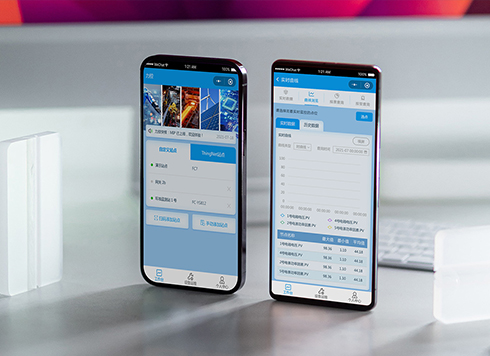 Likong Industrial IoT Tech Co., Ltd. Mini-program UI/UX Design
IIoT firms: mobile mini-program + platform. ...
-
 Livy Pig Farming IoT Platform UI Design
This IoT system uses sensors to monitor hog ...
-
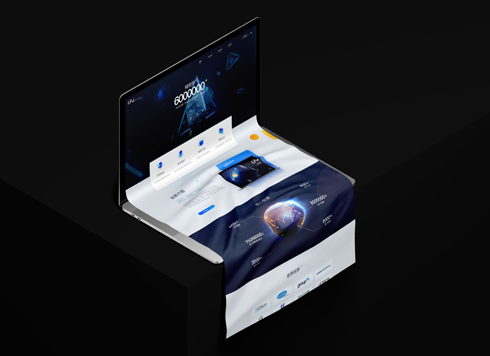 UI Design of the Internet Advertising Platform (a Sci-tech Sense Official Website)
The corporate website UI features a futuris ...
-
Is grey placeholder text mistaken for filled input because the hint looks too much like content, or because the field label has nowhere to sit?
Date: Nov 4, 2026 Read: 5
-
When users reach the third screen of a form and realize Save is still at the bottom, forcing them to scroll back and forth — should that button stay pinned to the screen?
Date: Nov 3, 2026 Read: 11
-
When support handles dozens of tickets a day, should the two or three most-used row actions move outside the “More” menu?
Date: Nov 2, 2026 Read: 19
-
In the admin, I filter by status, open a ticket, then go back and the list resets to all—did the browser forget, or were the filters never saved?
Date: Nov 1, 2026 Read: 26
-
Bottom-of-page dropdown options show only partially when opened: is the popover not flipping up, or is it clipped by an outer container?
Date: Oct 31, 2026 Read: 30