




When a modal closes and the list jumps back to the top, and users say they cannot find the row they just viewed, is that an unavoidable cost of scroll locking?
When a modal closes and the list jumps back to the top, it is usually not that the list has refreshed. It is more often that the scroll lock only locked the scroll and missed position restoration. The overlay blocks clicks, but it does not block the chained propagation of scroll events. To suppress that propagation, the page gets an added layer of fixed positioning; if the scroll distance is not written back on close, users are easily sent back to the first item in the list. Based on the common 2026 delivery standard, these three things should be accepted separately: covering the visuals, locking scrolling, and restoring on close. If any one is missing, users usually do not conclude that they swiped wrong; they conclude that the modal is broken.
When the list jumps back to the top after closing, which step is the problem?
Scrolling does not follow the rule that whoever is on top owns it. The browser starts from the touch point and goes upward to find the first scrollable container; after that container reaches its end, the remaining scroll amount continues to the parent, up to the page itself. This is the scroll chain. The overlay is usually an empty fixed-position layer; it changes the visual layer, but it does not change who can scroll.
On mobile, to suppress chained propagation, a common approach is: when the modal opens, add fixed positioning to the page root or body, record the current scroll distance in a variable, and use an offset to put the page back in place. At this point the page is no longer actually scrolling in the document flow; the position the user sees is held by that variable. If the variable is not written back and the fixed positioning is not removed on close, the position resets to zero, which shows up as the list instantly jumping back to the top.
So jumping to the top on close is not an inevitable cost of scroll locking; it is a missing restoration step. In projects, a background that moves along with the modal and a jump back to the top on close usually come from three different causes, and they are handled differently: one is that the page was not locked at all, and the overlay is just a sheet placed on top; another is that after the modal content scrolls to the end, the remaining scroll amount continues to the background; and another is that the modal is attached with absolute positioning inside a scrollable parent container. Visually it is a modal, but structurally it is just a block inside the list and moves together with the parent container.
Cover, lock, restore: three things to accept separately
Treating the modal scroll problem as one broad issue is the easiest way to fix one layer while another still fails. A less troublesome approach is to split it first into three actions that can be checked independently.
Cover the visuals
The overlay's job is to make the content behind it unclickable and unfocusable. The check point is click-through: when a finger or mouse lands on the overlay, buttons behind it should not be triggered, and the Tab key should not move focus to elements behind the overlay. This layer is unrelated to scrolling; doing it right does not mean the background will not move.
Lock scrolling
The check point is propagation: when the modal content scrolls to the end and the finger keeps swiping, the background list does not move at all; when the mouse hovers over the overlay and the wheel is turned, the background does not shift. Check touch on mobile and the wheel on desktop separately. Testing only on the machine in your hand makes it easy to miss one channel.
Restore on close
The check point is the simplest: close the modal, and the background stays at the item it was on before opening, does not return to the top, and the page does not jitter horizontally. The code added at this step is usually small, often within half a day by experience range, but if it is missed, the rework often takes half a day to two days, because testing and acceptance have to be run again.
Common approaches and their costs
No approach is clean in every environment. The list below follows the order commonly seen in 2026 projects, with costs stated together. Choose by user distribution, not by which implementation is shorter.
- Lock only the page overflow. Smallest change, often around one hour by experience, and enough for most desktop cases. The cost is that the disappearing scrollbar causes a horizontal shift, and the width usually has to be compensated. On mobile, some browsers respond inconsistently to this handling at the root level and can still scroll, so other methods are eventually stacked on top.
- Use fixed positioning to lock the page and record the scroll distance. A common mobile approach that suppresses most penetration; implementation effort often falls in an experience range of one to two days. The cost is that the position must be written back on close. Miss this step, and users return to the top of the list when they close the modal, which feels worse than penetration.
- Use styles such as overscroll-behavior to cut the scroll chain. Simple to write and performs well in newer browsers. The cost is that it only solves chained propagation, not the problem that the page was never locked. It usually still needs a basic lock layer, and older environments need a fallback.
- Use scripts to intercept touch scrolling and wheel events. A fallback method that covers corners the first three cannot handle, with the highest debugging and regression cost; cross-platform retesting often adds another half day. The cost is complex logic: the modal content itself must still scroll, listeners must avoid slowing scrolling, and it must distinguish whether to allow scrolling when a boundary is reached.
A relatively stable combination in delivery is: use the second approach for the basic lock, use the third inside the modal to cut propagation, and use the fourth only for device models that still fail. Using all three layers is not waste, because they solve three different problems: who can scroll, where scrolling goes after it ends, and where it returns on close. Note that these ranges are experience values; in a specific project they will vary up or down with the number of modals, the number of platforms, and the regression scope.
Delivery field notes: which part to protect first in a three-day schedule
One admin redesign example is fairly typical. The constraint was a schedule of only three to five days. The client said only that the modal now scrolls wrong, without saying on which platform. In the material, the background was a reconciliation table with dozens of rows, and the modal was an edit form; both conditions fell on the side of must handle. The first version added one line of overflow hidden and shipped. It looked fine on desktop, but when a mobile colleague tested it, it could still scroll, so it had to be reworked.
The second version changed to fixed positioning to lock the page, and penetration was suppressed. On launch day, the operations team reported that closing the modal sent the list back to the first item, and the row they had just checked could not be found. The fix was to record the scroll distance before opening, write it back after closing, and add padding compensation for the scrollbar width. In total, this kind of change often lands in an experience range of one to two days in projects; if multiple modal entry points and cross-platform regression are involved, the time goes up further. The cost is not in lines of code, but in running testing and acceptance again.
We later wrote this into the acceptance checklist: for changes involving modals, the restoration step is included in the delivery scope by default and is not left to post-launch feedback. The reason is that for both penetration and jump-to-top issues, users often describe them as hard to use or always flickering, and only during troubleshooting do we find that the root cause is in the scroll layer.
When to lock and when not to lock
Scroll isolation is generally suitable for these cases: edit modals in mobile admin back offices, selectors with long lists, drawers and slide-out panels opened from detail pages, and pages whose background is itself a long table or long form. Their common features are a scrollable background, a modal that stays open for a relatively long time, and a high recovery cost after accidental closing or misoperation. Drawers need special attention: visually they do not look like modals, so users are more likely to scroll the background while looking at the panel, and the sense of penetration is stronger. The judgment criteria should be consistent with full-screen modals.
The cases where locking can be skipped are equally clear: when the modal content is no taller than one screen, the background page has no scrollable area, or the modal is only a binary confirmation dialog, it is more reliable not to lock scrolling. Forcing a lock adds extra problems with position restoration and scrollbar jitter. A full-page navigation form page also does not need this logic, because there is no background there and users are supposed to scroll down. Conversely, if the modal content itself is very short and does not need to scroll at all, then not being able to scroll inside the modal is the correct behavior; making it scrollable would make users think there is more content below that is not shown.
How to check during acceptance
To judge whether it is done well, you do not need to read the code first. Walk through the following items; if any one fails, it is not done:
- Scroll to the end inside the modal: keep swiping with a finger, and the background list does not move at all.
- Close the modal: the background stays at the item it was on before opening and does not return to the top.
- Desktop wheel: with the mouse over the overlay, scroll the wheel, and the background does not shift.
- Keyboard operation: the Tab key does not move focus to elements behind the overlay.
- Test both platforms: choose iOS, Android, and desktop browsers by user share; do not test only the machine in your hand.
- When the window narrows or the page zooms: between the appearance and disappearance of the scrollbar, the page does not jitter horizontally.
- Walk through multiple entry points: the same modal opened from the list page, detail page, and message notifications should behave consistently.
FAQ
When a modal closes and the list returns to the top, is that inevitable once scrolling is locked?
No. When locking, the scroll distance is recorded in a variable; it resets to zero only if it is not written back on close. Adding record-before-open and write-back-on-close usually does not require changing the modal structure.
If it is used only on a desktop intranet and the background is not long, is this still needed?
No. When the background fits in one screen, has no scrollable area, and the modal stays open only briefly, the restoration and jitter issues caused by locking are more troublesome than penetration; keeping the default is simpler.
Overflow hidden is already added, but it still scrolls on mobile. Why?
That style mainly controls document scrolling of the page. On mobile, some browsers handle the root inconsistently, and touch scrolling can still pass the scroll amount to the parent. A common approach is to add fixed positioning as a fallback layer.
The desktop mouse wheel also moves the background. Is that the same cause as on mobile?
It belongs to the same scroll chain, but the input channel is different: mobile uses touch scrolling, while desktop uses wheel events. Fallback listeners must be verified separately; testing only touch screens easily misses the desktop side.
Should drawers and slide-out panels be handled like modals too?
Yes. A drawer does not look like a modal, so users are more likely to scroll the background while looking at the panel, and the sense of penetration is stronger. The judgment criteria should be consistent with full-screen modals; do not let it go just because it is a sidebar.
Action guide: before making changes, run through the current state with the checklist above, split the modal scroll problem into which part is failing: cover, lock, or restore, and then decide how many layers to add. If the budget is tight, protect the restoration step first. The boundaries are: short modals whose content is less than one screen, pages whose background has no scrollable area, and full-page navigation form pages do not need this logic; the return on investment is not worth it.
-
 UI Design & Prototype for Sunwayland's ThingNet IIoT Platform
UI design and prototyping for ThingNet IIoT ...
-
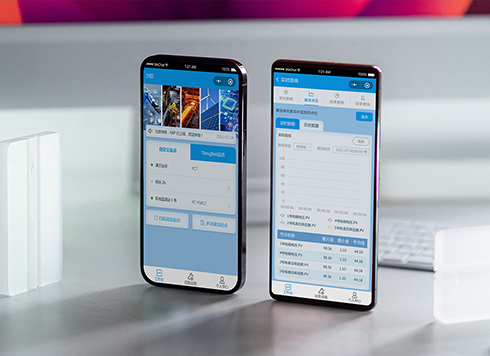 Likong Industrial IoT Tech Co., Ltd. Mini-program UI/UX Design
IIoT firms: mobile mini-program + platform. ...
-
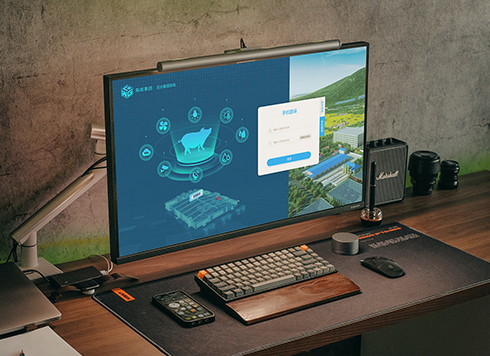 Livy Pig Farming IoT Platform UI Design
This IoT system uses sensors to monitor hog ...
-
 UI Design of the Internet Advertising Platform (a Sci-tech Sense Official Website)
The corporate website UI features a futuris ...
-
Is grey placeholder text mistaken for filled input because the hint looks too much like content, or because the field label has nowhere to sit?
Date: Nov 4, 2026 Read: 4
-
When users reach the third screen of a form and realize Save is still at the bottom, forcing them to scroll back and forth — should that button stay pinned to the screen?
Date: Nov 3, 2026 Read: 11
-
When support handles dozens of tickets a day, should the two or three most-used row actions move outside the “More” menu?
Date: Nov 2, 2026 Read: 17
-
In the admin, I filter by status, open a ticket, then go back and the list resets to all—did the browser forget, or were the filters never saved?
Date: Nov 1, 2026 Read: 25
-
Bottom-of-page dropdown options show only partially when opened: is the popover not flipping up, or is it clipped by an outer container?
Date: Oct 31, 2026 Read: 30